
Outbound Call Center Software: What It Is and How It Works


Ask anyone who runs an outbound floor and they'll name the same enemy: dead air. Agents stuck listening to ring tones, working through dead numbers by hand, burning half a shift to reach a handful of real people. Outbound call center software exists to take that dead air out of the day. It dials for your agents, hands them only the calls a live person actually answered, and keeps the records that prove the campaign stayed inside the rules.
This guide covers how it works, the dialing modes and when each fits, the compliance limits every platform has to respect, and what separates an adequate system from a good one.
Quick answer Outbound call center software is a platform that automates outgoing calls for sales, collections, surveys, and proactive support. It pairs an automated dialer with CRM data, call scripts, recording, do-not-call scrubbing, and real-time analytics, so a team places far more calls than manual dialing allows while tracking connect rate, agent talk time, and the abandoned-call rate regulators cap.
What Is Outbound Call Center Software?
The word "outbound" does real work here. An inbound center answers calls that come in; an outbound center makes the calls that go out, and that one difference shapes what the software is built to do.
- Inbound software optimizes for routing and queue management.
- Outbound software optimizes for dialing, list management, and campaign analytics.
- Blended software lets the same agents handle both, which suits account management and customer-success teams.
For a team focused on outreach, what matters is the outbound feature set: the dialer, number reputation, compliance controls, and reporting. The rest of this guide is about that set.
How Outbound Call Center Software Works
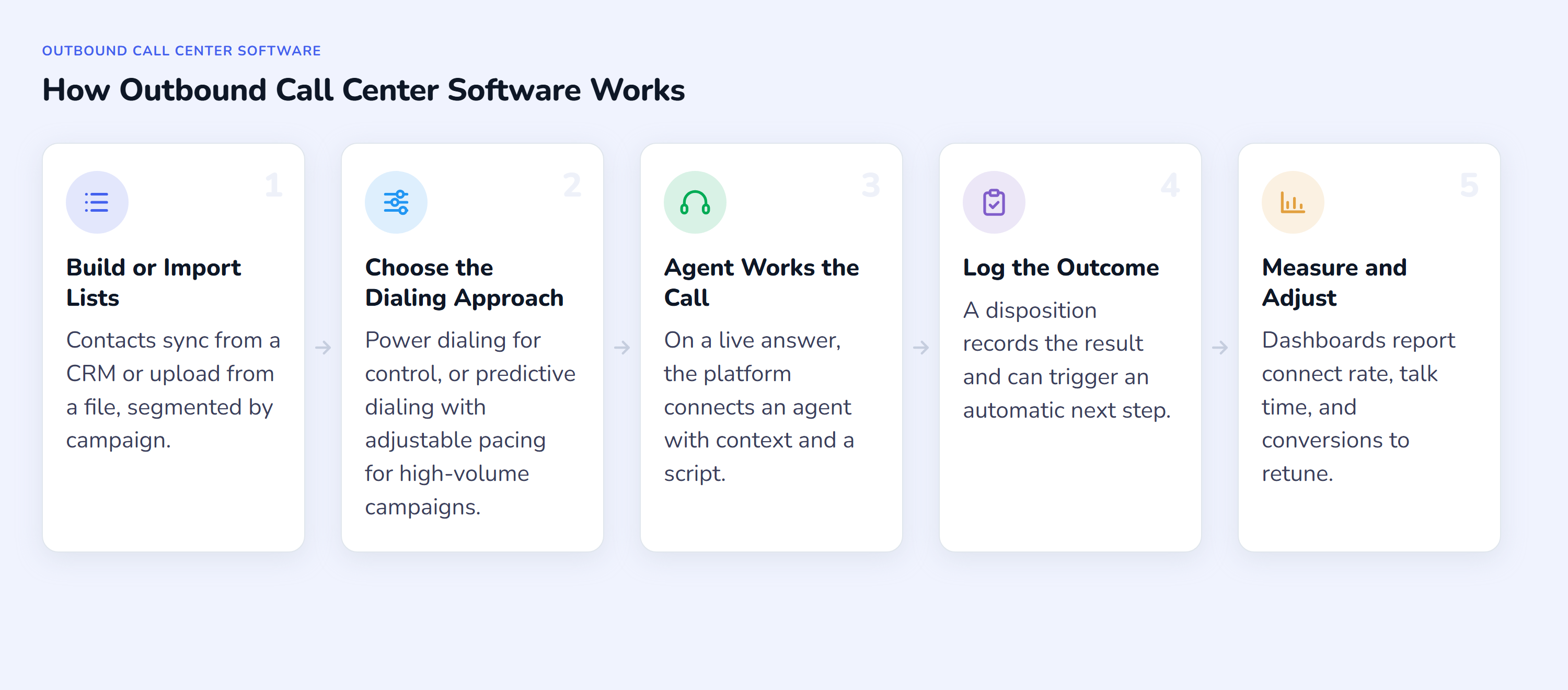
The software sits between your contact data and the phone network and runs each campaign through a repeatable loop:
- Build or import lists. Contacts sync from a CRM or upload from a file, segmented by campaign, region, time zone, or lead score, and scrubbed against do-not-call registries before the first dial.
- Choose the dialing approach. Power dialing places calls one at a time for control; predictive dialing with adjustable pacing drives volume (both covered below). This choice is the single biggest lever on both productivity and compliance risk.
- Connect the agent. On a live answer, the platform routes the call to an available agent and pops the contact record and script on screen, so the conversation opens with context instead of a cold "who am I speaking to?"
- Log the outcome. Agents set a disposition (sale, callback, no answer, do-not-call), which can trigger an automatic next step such as a follow-up SMS, a scheduled callback, or a rule that recycles unanswered numbers.
- Measure and adjust. Dashboards report connect rate, talk time, abandonment, and conversion per campaign and per agent, so managers retune lists, pacing, and staffing before a client notices a dip.
Speed is part of why the loop is automated at all. A Harvard Business Review study of online sales leads found firms that made contact within an hour were close to seven times likelier to have a meaningful conversation with a decision-maker than those that waited even 60 minutes longer (Harvard Business Review, 2011). For warm-lead and callback campaigns, the dialer and its recycle rules exist to shorten that gap.
Core Features, and What Separates Adequate From Good
Every platform lists the same features. The gap between a demo that looks fine and a system that performs at scale is in the details below, so evaluate each one on the discriminator, not the checkbox.
- A dialer that fits the campaign. A run of 50 warm callbacks and a list of 50,000 cold records call for very different dialing. A power dialer that places calls one after another gives agents full control for considered, lower-volume outreach; a predictive dialer with adjustable pacing drives the throughput a high-volume campaign needs. What matters is matching the approach and pacing to the job, not forcing one speed onto every campaign.
- Answering-machine detection (AMD). The number that matters is the false-positive rate. A false positive hangs up on a real person, which is a silent call, which is a regulated event (see below). Ask a vendor for its AMD accuracy, not just whether AMD exists.
- Caller-ID reputation monitoring. Numbers that get labeled "Spam Likely" stop being answered no matter how good the dialer is. A platform that only dials, without watching how carriers score your numbers, is solving half the problem.
- CRM integration with screen pop. The test is whether the record opens automatically the moment the call connects, and whether the disposition writes back without a second tool. Manual copy-paste between dialer and CRM quietly erases the productivity the dialer bought you.
- Real-time analytics, not just historical reports. Abandonment and connect rate have to be visible live, because a compliance breach or a dead number list is only worth catching while the campaign is still running. (For the metrics to track, see our guide to outbound call center KPIs.)
- Compliance tooling. Do-not-call scrubbing, consent records, calling-window controls by time zone, and an auto-played abandoned-call message are the difference between a defensible campaign and a fine.
- Local presence and number management. Dialing a local caller ID lifts pickup rates; provisioning and rotating numbers across markets keeps a single flagged number from sinking a whole campaign.
Outbound Dialing Modes and the Abandonment Ceiling That Governs Them
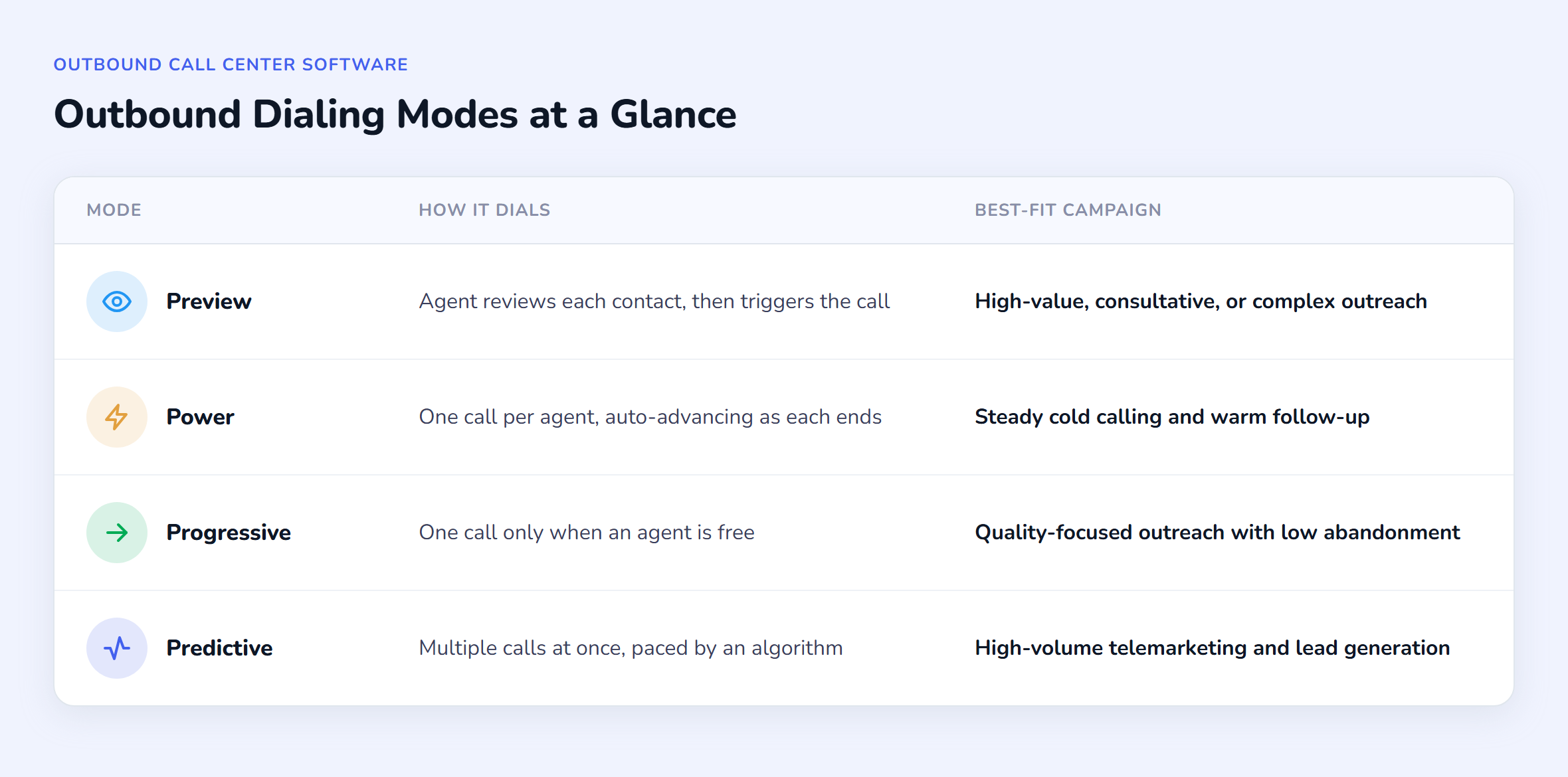
The dialing mode sets how aggressively the system places calls and how much control agents keep. Four modes cover most outbound work:
| Mode | How it dials | Best-fit campaign |
|---|---|---|
| Preview | Agent reviews each contact, then triggers the call | High-value, consultative, or complex outreach |
| Power | One call per agent, auto-advancing as each ends | Steady cold calling and warm follow-up |
| Progressive | One call only when an agent is free | Quality-focused outreach with low abandonment |
| Predictive | Multiple calls at once, paced by an algorithm | High-volume telemarketing and lead generation |
Every mode trades off the same two things: reach and control. At one end, a power dialer places one call at a time per agent, which keeps agents in control and abandonment near zero. At the other, a predictive dialer places several calls at once and paces them by algorithm, which maximizes talk time but can connect a live person to no available agent, an abandoned call. That trade-off is not only operational, it is legally bounded, so how aggressively you pace is a decision, not a default.
Each mode is a topic in its own right. For the full detail, see the dedicated explainers on the preview and predictive dialer, the power dialer, the progressive dialer, and the AI predictive dialer. If you are weighing scale against customer experience, our predictive vs progressive dialer comparison maps the choice directly.
The Compliance Limits Every Outbound Platform Has to Respect
This is the part generic feature lists skip, and it is the part a contact-center manager is personally accountable for. The rules vary by market, but the shape is consistent, and your software has to enforce them.
Remember: the 3% abandoned-call ceiling In the US, telemarketers may abandon no more than 3% of calls answered live by a person, measured over a 30-day period per campaign; a call counts as abandoned if it is not connected to a live rep within 2 seconds of the person's greeting (47 CFR 64.1200(a)(7)). The UK applies the same 3% cap but measures it over a stricter 24-hour window, with penalties up to £2 million for persistent misuse (Ofcom).
Four controls follow directly from that:
- Pacing and AMD are your abandonment levers. Predictive pacing that is too aggressive, or AMD that misfires, pushes you over the 3% line. The abandoned call also has to play a recorded identification message within two seconds, so the software has to handle the drop, not just count it.
- The AMD false-positive trap. When AMD wrongly tags a live person as a machine and hangs up, that is a silent call. UK rules add a "24-hour rule": once AMD flags a line, it cannot be redialled for 24 hours unless an agent is on the line. AMD that cannot prove its accuracy is a liability, and turning it off is a legitimate compliance choice.
- Caller-ID authentication and spam labeling. Under the FCC's STIR/SHAKEN framework, carriers verify caller ID and use it to label or block suspected spam, which is meant to help people trust the numbers they answer (FCC). The practical effect for you: unverified or over-dialed numbers get labeled, and labeled numbers stop being answered. Reputation monitoring and number rotation are how you fight back.
- Consent and do-not-call. Consent handling falls under GDPR in the EU and the TCPA and do-not-call registry in the US, and other countries run their own registries and calling-window limits. Scrubbing lists before each dial and keeping consent records is table stakes, not a premium feature.
How Squaretalk Supports Outbound Call Center Workflows
Squaretalk is built around outbound calling at scale, and it covers both ends of the reach-versus-control spectrum. For controlled, one-at-a-time outreach, its power dialer places calls one after another so agents keep full control of each conversation. For high-volume campaigns, the Predictive Dialer adds adjustable pacing and runs the dialing end to end: a Workflow Builder for rule-based automations (including disposition-triggered SMS), List Recycle Rules that re-dial missed leads automatically, answering-machine detection, and direct CRM connections so agent screens open with context. Do-not-call management and call recording give you the compliance records the rules above demand.
Because a call only converts if it is answered, Squaretalk's Spam Checker sends real-time alerts when your business numbers get wrongly labeled "Spam Likely," so you can rotate or remediate before answer rates slide.
For BPOs running outbound campaigns across several client projects, the platform adds the controls that model needs: campaign management separated by client, a Lead ID shown to agents in place of personal data for privacy, and role-based permissions with IP and geographic whitelisting. Squaretalk states GDPR and TCPA compliance and provisions local numbers in 150+ countries, which matters when one BPO floor dials into multiple regulatory markets from a single platform. The full setup is on the BPO contact center solution page.
Last verified July 29, 2026.
The Short Version
Outbound call center software turns manual dialing into managed, measurable campaigns: it scrubs and segments your contacts, dials them in the mode that fits the work, connects agents to live answers with context, and reports on connect rate, talk time, and the abandoned-call rate you are legally bound to control. Squaretalk is an AI-powered cloud contact center platform combining voice, WhatsApp, SMS, email, predictive dialing, and conversation analytics, with local numbers in 150+ countries and transcription in 100+ languages. If you are choosing a platform for outbound campaigns, talk to our sales team about how it fits your workflow.
Frequently Asked Questions
What is the difference between inbound and outbound call center software? Inbound software is built to receive calls, with routing and queue management at its core. Outbound software is built to place them, with automated dialers, do-not-call scrubbing, and campaign analytics at its core. A team that mostly answers contacts needs the first; a team that mostly initiates them needs the second; teams that do both often run blended software so agents can switch between the two.
How many abandoned calls is an outbound campaign allowed? In the US, no more than 3% of calls answered live may be abandoned, measured over a 30-day period per campaign, where "abandoned" means not reaching a live rep within two seconds of the greeting. The UK uses the same 3% cap but measures it every 24 hours. Because the limit is enforceable, the dialing mode and pacing you choose are compliance decisions, not just productivity ones.
Is there free outbound call center software? Some vendors offer free trials or limited free tiers, and open-source dialers exist. They are enough to test a workflow, but free options usually cap agents, calling minutes, or the features an outbound team actually depends on: predictive dialing, CRM integration, answering-machine detection, and compliance tooling. For a working operation with real call volume, a paid plan is normally required.
Why do our numbers keep getting flagged as spam, and can software fix it? Carriers score numbers using caller-ID authentication and calling patterns, so a number that dials at high volume or gets marked by recipients can be labeled "Spam Likely," after which answer rates fall sharply. Software cannot stop carriers from scoring numbers, but reputation-monitoring tools alert you when a number is flagged so you can rest or rotate it, and dialing a verified local caller ID helps keep scores healthy.
Should we use a power dialer or a predictive dialer? Match the tool to the campaign. A power dialer places one call at a time per agent, which suits steady cold calling, warm follow-up, and any campaign where agents need full control and abandonment has to stay near zero. A predictive dialer places several calls at once with adjustable pacing, which suits large cold lists and bigger teams that need maximum talk time and can keep abandonment inside the legal limit. Many outbound teams use both: a power dialer for considered outreach and a predictive dialer for high-volume campaigns.