
Best Power Dialer for Sales Teams: 8 Features That Matter in 2026

Every power dialer pitch sounds the same after the third demo. "AI-powered." "Boosts productivity." "Increases connect rates." The vendor slide decks all promise the same outcomes, and it gets hard to tell which platform actually delivers and which one just has a better sales team.
A sales leader evaluating power dialers doesn't need another feature list copied from a vendor's website. What's useful is a way to separate the features that move the numbers you're accountable for connect rate, rep talk time, pipeline velocity, from the ones that are mostly there to fill out a comparison chart. Below are the 8 features worth actually testing before you sign a contract, independent of any single vendor's marketing.
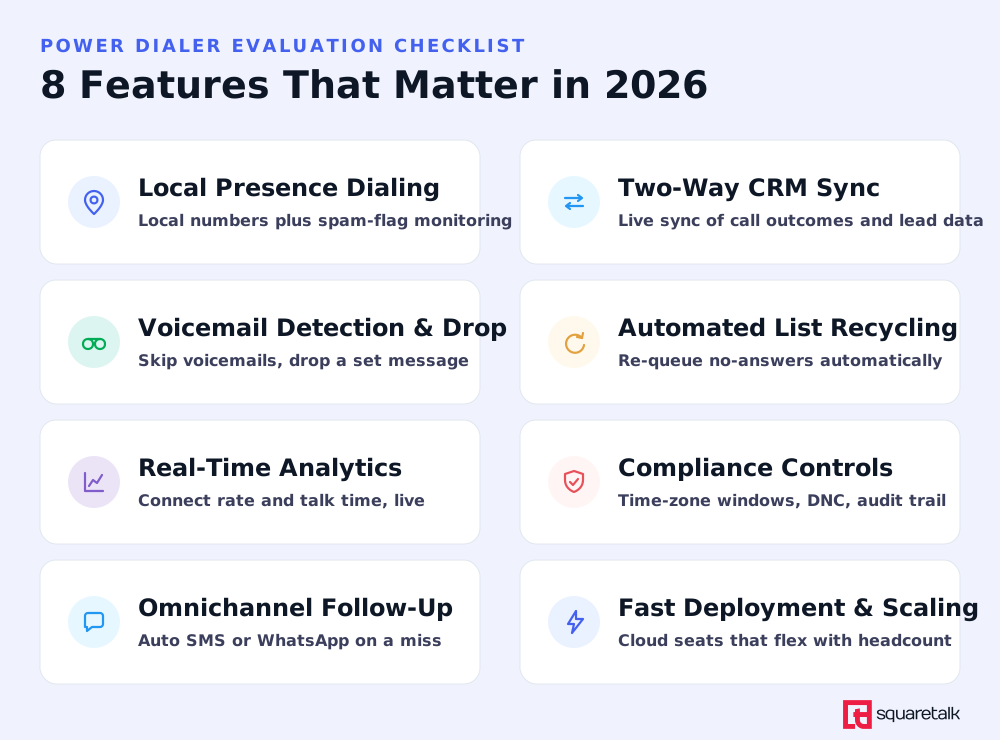
1. Local presence dialing and caller ID reputation monitoring
If your outbound numbers get flagged as "Spam Likely," none of the other features on this list matter, because the calls never get answered. Pew Research has found that roughly 80% of Americans don't generally answer calls from numbers they don't recognize, and Hiya's Global Call Threat Report puts the worldwide spam-and-fraud rate for unknown calls at around one in four. A number that looks local to the person you're calling, and one that isn't already flagged by carrier spam-detection systems, closes a meaningful share of that gap before your rep even says a word.
Test this by asking a vendor two specific questions:
- How do they match caller ID to the area code you're dialing?
- What happens when one of your numbers gets flagged.
A real answer names a monitoring mechanism and a remediation path (swap the number, alert you, or both). "Our numbers don't get flagged" is not an answer.
2. Real-time, two-way CRM integration
A power dialer that doesn't sync with your CRM in real time creates a second system of record, and reps will inevitably work from whichever one is more convenient in the moment. That means duplicate outreach, missed follow-ups, and a sales leader who can't trust the pipeline numbers coming out of either system.
Look for integration that pushes call outcomes, disposition statuses, and notes into the CRM the moment a call ends, and pulls lead and account data into the dialer before the call starts, so reps see relevant context without switching tabs. Native connections to the CRM you already run, rather than a generic webhook you have to configure yourself, cut a lot of that setup and maintenance work.
3. Accurate answering machine detection and automated voicemail drop
Answering machine detection (AMD) determines how much of your reps' day gets spent listening to voicemail greetings versus talking to live prospects. Weak detection either connects reps to voicemail boxes it should have skipped, or worse, cuts off the first few seconds of a live answer while it's still deciding what it heard.
Automated voicemail drop matters just as much: it lets a rep leave a consistent, pre-recorded message the instant detection confirms voicemail, then immediately moves to the next number, instead of manually re-recording the same message dozens of times a day. Ask vendors for their detection accuracy rate and whether it's measured against real call data, not a lab environment.
4. Automated list recycling and smart re-dial rules
Most outbound lists have a long tail of numbers that didn't connect on the first attempt for reasons that have nothing to do with lead quality: busy signal, no answer, a bad time of day. A power dialer that can automatically re-queue those numbers after a set interval, rather than requiring a rep or manager to manually rebuild a call list, recovers pipeline that would otherwise just sit unworked.
This matters more for pipeline math than it sounds: most contactable leads don't answer on the first attempt, for reasons that have nothing to do with lead quality, so a meaningful share of your reachable pipeline is sitting in the numbers that didn't pick up yet. Ask how re-dial timing is configured (fixed interval, time-zone aware, disposition-based) and whether reps can override it for specific campaigns.
5. Real-time analytics and call-outcome reporting
You can't coach what you can't see, and dashboards that update once a day are functionally useless for a sales leader trying to adjust a campaign mid-morning. Gong's analysis of more than 300 million cold calls found that an average rep needs roughly 19 attempts to land one conversation, while top-quartile reps get there in about 8. That gap is exactly the kind of thing real-time monitoring is supposed to surface, so you can identify which reps, scripts, or call times are driving it before the week is over, not after.
At minimum, look for live dashboards on connect rate, talk time, and disposition breakdown, plus the ability to export or query that data rather than being stuck with a fixed set of pre-built reports.
6. Built-in compliance controls
Outbound calling is regulated everywhere your team operates, not just in the market you're most familiar with. In the US, that means TCPA-style consent and calling-window rules; in the EU and other markets, GDPR governs how contact data can be stored and used. A power dialer built for one jurisdiction and retrofitted for others is a real operational risk if your team calls across borders.
Look for Do-Not-Call list scrubbing, an audit trail of consent and call history you can produce if a regulator or a customer ever asks. These aren't features that show up in a flashy demo, but they're the ones that get quietly critical the first time your company faces an inquiry.
7. Omnichannel follow-up automation
A missed call is not the end of an outreach attempt, it's a trigger for the next one. The most useful power dialers let you configure an automatic SMS or WhatsApp message the moment a call goes unanswered or a specific disposition gets logged, so the prospect gets a follow-up within minutes instead of whenever a rep remembers to send one.
This is less about volume and more about consistency: every missed connection gets the same quality of follow-up, regardless of how busy a given rep is that day. Check whether the messaging channels can be configured per campaign and whether replies route back to the same rep who made the original call.
8. Fast deployment and seat-based scalability
A power dialer that takes weeks to configure delays the ramp of every rep you hire in the meantime, and one that requires new hardware or a rigid contract structure makes it expensive to scale up for a seasonal push or scale down after one. Cloud-based platforms that let you add or remove seats without a new implementation project are the ones that actually keep pace with how sales headcount moves in practice.
Ask for a realistic timeline from contract signature to a rep's first live call, not the vendor's best-case answer, and confirm whether the pricing model penalizes you for adding seats mid-contract.
Putting the framework to work
Choosing the right power dialer features becomes much easier when you map them to real-world scenarios.
Scenario 1: Scaling a High-Growth Sales Team
A SaaS company with 40 SDRs is entering a new quarter with ambitious revenue targets and an aggressive hiring plan. Management introduces a power dialer to maintain outbound productivity as new reps ramp up.
Caller ID reputation monitoring (feature 1) keeps newly provisioned numbers from getting flagged before reps even start dialing. Answering machine detection (feature 3) means new hires aren't burning their first weeks fumbling through voicemail boxes. Real-time analytics (feature 5) let the sales leader spot which of the newly ramped reps are struggling with connect rate in week one, rather than finding out at the end-of-quarter review when there's no time left to fix it.
Scenario 2: Testing a New Outbound Strategy
A sales team wants to evaluate a new power dialer before committing to a company-wide rollout. Instead of migrating every rep, they launch a two-week pilot using a list of warm leads.
Automated list recycling (feature 4) makes sure leads that didn't answer on the first pass get worked again without manual list-building. Omnichannel follow-up (feature 7) triggers a same-day SMS to any lead the dialer couldn't reach by phone, so the pilot doesn't lose contacts simply because they were busy at 10am. Fast deployment (feature 8) means the pilot can actually launch inside the two-week window instead of spending most of it on setup.
This framework applies whether you land on a power dialer or end up needing more volume than one-to-one pacing supports. A progressive dialer trades some of that speed for stricter call-abandonment control, which matters more for some compliance-sensitive campaigns than others.
Squaretalk's Power Dialer and Spam Checker cover this framework directly, from caller ID reputation monitoring to real-time reporting and automated list recycling. If you want to see how it holds up against this checklist, book a live demo and run through it feature by feature.
Last verified: July 14, 2026
Author: Damyana Gramatikova